7 Real Estate Facebook Ad Examples That Convert in 2026
In the competitive landscape of 2026, a generic 'Just Listed' post simply won't cut it. To capture high-intent leads and build a sustainable pipeline, real estate agents need Facebook ad strategies that are specific, compelling, and data-driven. But where do you find inspiration for real estate Facebook ad examples that actually work? The good news is you don't have to reinvent the wheel.
This guide breaks down high-performing real estate ad frameworks, moving beyond pretty pictures to dissect the exact copy, creative, and targeting that drive results. We’ll analyze what makes each ad effective and provide actionable templates and strategies you can replicate today. For a broader perspective on successful campaigns, you can also delve into strategies for creating effective real estate ads that sell.
Our goal is to give you a blueprint. We will show you not just what to do, but how to do it. You'll learn where to find top-tier creative assets and how to leverage powerful AI tools to generate the compelling content needed for your campaigns. This includes everything from hyper-local CMA data to stunning virtual staging visuals that will make your ads stand out from the crowd. Forget guesswork; it's time to build a lead-generation machine with proven tactics.
1. The “What’s Your Home Worth?” Lead Magnet Ad
This classic approach remains a cornerstone for generating seller leads for a reason: it taps directly into a homeowner's curiosity about their most valuable asset. This real estate Facebook ad example from The Loken Group excels by combining a compelling offer with a clear, low-friction call to action, making it a powerful template for any agent.
(Note: Placeholder image - a real annotated screenshot would be here)
Strategic Breakdown
The ad's effectiveness lies in its psychological pull. It avoids the high-commitment ask of "Ready to Sell?" and instead poses a simple, intriguing question. The creative is clean and aspirational, using an image of an attractive home that reflects the target market's desired property type.
The ad copy is concise and benefit-driven. It promises a "FREE Home Value Report" and highlights the benefit of knowing your equity, a powerful motivator for potential sellers considering a move-up or a cash-out.
Key Insight: The most successful lead generation ads offer immediate, tangible value in exchange for contact information. A home valuation report is a perfect example of a high-value, low-commitment offer that homeowners find difficult to resist.
Replicating This Ad Strategy
Here’s how you can create a similar high-performing ad using Saleswise to streamline the process.
Ad Creative:
- Image: Use a high-quality, professional photo of a recently sold listing in your target neighborhood.
- Video (A/B Test): Create a short video (15-30 seconds) of yourself briefly explaining how you calculate home values and what homeowners will learn from your free report.
Ad Copy Template:
- Headline:
Curious What Your [Your City/Neighborhood] Home is Worth? - Primary Text:
Home values in [Your City/Neighborhood] are changing. Find out how much equity you have with a FREE, no-obligation home value report. Click below to get yours in minutes! #RealEstate #HomeValue #[YourCity]Realtor - Description:
Get a Professional Home Value Assessment Today.
Targeting & CTA:
- Audience: Homeowners aged 30-65+ in your specific zip codes or farming area. You can also create a Lookalike Audience based on your past client list.
- CTA Button:
Learn MoreorGet Offer
How Saleswise Accelerates This:
- Generate a CMA Snippet: Use Saleswise to instantly create a visually appealing Comparative Market Analysis (CMA) snippet for a specific neighborhood.
- Create Your Landing Page: Your ad should link to a dedicated landing page. Use the Saleswise CMA snippet as the hero image and include a simple form asking for the user's address and email.
- Automate Follow-Up: Once a lead submits their info, Saleswise can automatically generate and email the full, personalized CMA report, ensuring instant value delivery and positioning you as a knowledgeable expert.
2. The “Just Listed” Carousel Ad
Announcing a new listing is a prime opportunity to capture both buyer and seller leads. This "Just Listed" real estate Facebook ad example leverages the carousel format to showcase a property's best features, creating an engaging, swipeable experience that mimics browsing a real estate portal. It effectively targets active buyers while simultaneously demonstrating marketing prowess to potential sellers in the area.

Strategic Breakdown
The strength of the carousel ad is its interactive nature. Instead of a single static image, it invites users to explore the property room by room, increasing engagement and time spent on the ad. Each carousel card can highlight a unique selling point like a renovated kitchen, a spacious backyard, or a stunning master bathroom, telling a more complete story of the home.
The ad copy is direct and urgent, using phrases like "Just Listed!" and "Won't Last Long!" to create a sense of scarcity. The headline clearly states the property's key details (e.g., "3 Bed, 2 Bath with Pool in [Neighborhood]"), immediately qualifying interested buyers.
Key Insight: A carousel ad transforms a simple listing announcement into a virtual mini-tour. By showcasing multiple high-quality photos, you appeal directly to buyers' visual discovery process and prove your high-end marketing capabilities to prospective sellers observing your ads.
Replicating This Ad Strategy
Building a professional-looking carousel ad is faster than ever. Here’s how you can model this successful approach, using tools like Canva and Saleswise to enhance your creative assets.
Ad Creative:
- Images: Use 5-7 professional, high-resolution photos of the property. Start with the best exterior shot, followed by the kitchen, living area, master bedroom/bath, and the backyard or unique feature.
- Video Cards (A/B Test): Intersperse your photo cards with short, 5-10 second video clips panning across a room or showing off an outdoor feature.
Ad Copy Template:
- Headline:
JUST LISTED | 4 Bed, 3 Bath Home in [Neighborhood] - Primary Text:
✨ Your dream home has arrived! This stunning [Style, e.g., Craftsman] in [Neighborhood] just hit the market. Featuring [Highlight 1], [Highlight 2], and a [Highlight 3]. Click to see all photos and schedule your private tour before it's gone! #JustListed #[City]RealEstate #[YourBrokerage] - Description:
View Price, Photos, and 3D Tour Now!
Targeting & CTA:
- Audience: Target users in a 15-mile radius of the property who have shown interest in Zillow, Trulia, or Realtor.com. Layer this with demographic targeting for likely homebuyers (e.g., aged 28-55). Also, target homeowners in the same zip code to attract potential sellers.
- CTA Button:
Learn More
How Saleswise Accelerates This:
- Enhance Your Photos: Before uploading to Canva, use Saleswise's Virtual Staging feature on any empty room photos. This instantly furnishes the space, helping buyers visualize themselves in the home and making your ad creative far more compelling.
- Generate Descriptions: Use the Saleswise AI to write captivating, benefit-focused descriptions for each carousel card, ensuring your copy is as professional as your images. Learn more about creating standout visuals and copy in our guide to real estate social media content.
- Create a Listing Landing Page: The 'Learn More' button should link to a dedicated single-property website or landing page, not just the MLS sheet. This provides a premium, focused experience for interested buyers to get more details and contact you directly.
3. The "Just Listed" Urgency Ad
A "Just Listed" ad is a fundamental tool for generating immediate buyer interest. This real estate Facebook ad example from The Whissel Realty Group effectively creates urgency and social proof by highlighting a new, desirable property hitting the market. It’s designed to capture the attention of active buyers and drive them to a specific listing page for more details.
(Note: Placeholder image - a real annotated screenshot would be here)
Strategic Breakdown
This ad's power comes from its timeliness and specificity. It’s not a generic ad; it's an announcement. The creative uses high-quality, professional photography, often showcasing the home's best feature on the main ad image (e.g., the kitchen, curb appeal, or backyard).
The ad copy is direct and action-oriented. It uses phrases like "Just Listed!" and "Won't Last Long!" to create a sense of urgency. It also includes key property details like the number of beds/baths and location to pre-qualify viewers, ensuring that clicks come from genuinely interested buyers.
Key Insight: Create a fear of missing out (FOMO). By positioning a new listing as a limited-time opportunity, you motivate active buyers to act immediately rather than saving the post for later. The goal is to drive clicks to your listing page or direct messages right away.
Replicating This Ad Strategy
Here’s how you can launch a compelling "Just Listed" ad, using Saleswise to enhance your visuals and follow-up.
Ad Creative:
- Image: Use a stunning, professionally shot photo of the property. The "hero" image should be the most captivating one.
- Video (A/B Test): Create a 30-60 second walkthrough video or a slideshow of the best photos set to music. A quick tour often has a higher engagement rate.
Ad Copy Template:
- Headline:
✨ JUST LISTED in [Neighborhood]! Your Dream Home Awaits. - Primary Text:
🚨 New on Market! This stunning 4-bed, 3-bath home in the heart of [Neighborhood] won't last long. Featuring a gourmet kitchen and a beautiful backyard perfect for entertaining. Tap below for the full photo gallery, price, and to schedule a private tour! #JustListed #[YourCity]Homes #[DreamHome] - Description:
View 24+ Photos & Full Property Details.
Targeting & CTA:
- Audience: Target users in your city/region who have shown interest in Zillow, Trulia, or Realtor.com. You can also create a Special Ad Category audience for housing. Retarget visitors who have viewed other listings on your website.
- CTA Button:
Learn More
How Saleswise Accelerates This:
- Enhance Your Photos: Before posting, use Saleswise's Virtual Staging feature to furnish empty rooms in your listing photos, making the property feel more inviting and helping buyers visualize themselves living there.
- Generate a Compelling Description: Instantly create a captivating, SEO-friendly property description using Saleswise to paste directly into your ad copy and on your website's listing page.
- Automate Lead Nurturing: When a user clicks "Learn More" and provides their contact info on your landing page, trigger a Saleswise automated email sequence that sends them more property details, a link to the virtual tour, and invites them to an open house.
4. The “Done-For-You” Template Pack Ad
For agents who need professional-looking designs without the time or budget for a graphic designer, pre-made templates are a game-changer. This approach, leveraging templates from marketplaces like Etsy, allows agents to quickly launch a variety of campaign types, from "Just Listed" to "Open House," with a consistent and polished brand aesthetic. This real estate Facebook ad example shows how a template can be adapted for a specific listing.
(Note: Placeholder image - a real annotated screenshot of a Facebook ad made with an Etsy template would be here)
Strategic Breakdown
The core strategy here is efficiency and branding consistency. Instead of starting from scratch, agents purchase a bundle of templates (often editable in Canva) and simply plug in their listing photos, details, and branding. The ad's effectiveness comes from its professional design, which builds credibility and captures attention in a crowded feed.
These templates are designed by creatives who understand social media trends, often incorporating clean layouts, modern fonts, and clear calls to action. The ad copy can then be tailored to the specific goal, whether it's driving traffic to a listing page or capturing open house RSVPs.
Key Insight: You don't need to be a design expert to run beautiful, high-performing ads. Leveraging professionally designed templates allows you to focus on the marketing strategy and message, not the graphic design software.
Replicating This Ad Strategy
Here’s how you can find a template on Etsy and use Saleswise to make it even more powerful.
Ad Creative:
- Template Source: Visit Etsy and search for “real estate Facebook ad templates Canva.” Look for sellers with high ratings and bundles that match your brand’s style.
- Image: Use the template as a frame for your best professional listing photos. Ensure the images are high-resolution and showcase the property's key features.
- Video (A/B Test): Some Etsy templates are designed for video. Create a simple slideshow of listing photos within the video template to create a dynamic Reel or Story ad.
Ad Copy Template:
- Headline:
Just Listed in [Neighborhood]! Modern 3 Bed, 2 Bath - Primary Text:
✨ Your dream home awaits in [Your City/Neighborhood]! This stunning property features [Feature 1], [Feature 2], and a beautiful backyard perfect for entertaining. See all the photos and details now! #JustListed #[City]RealEstate #[YourBrokerage] - Description:
Schedule Your Private Tour Today.
Targeting & CTA:
- Audience: Target users who have shown interest in Zillow or Realtor.com, aged 28-55, within a 15-mile radius of the listing. Layer with interests like "first-time homebuyer" or "luxury real estate" depending on the property.
- CTA Button:
Learn More
How Saleswise Accelerates This:
- Enhance Your Photos: Before dropping your photos into a template, use Saleswise’s Virtual Staging to furnish an empty room or the AI Photo Enhancer to make your images pop. A better photo makes the template look even more premium.
- Generate Compelling Copy: Use the Saleswise AI Listing Description Generator to create the primary text for your ad. It will highlight the best features in engaging, professionally written copy that you can paste directly into your Facebook ad campaign.
- Create a High-Value Destination: Link the ad to a single-property landing page that includes not just photos, but also a Saleswise-generated CMA Snippet for the neighborhood, providing instant added value to potential buyers who click through.
5. Creative Market: Premium Templates for a Polished Brand
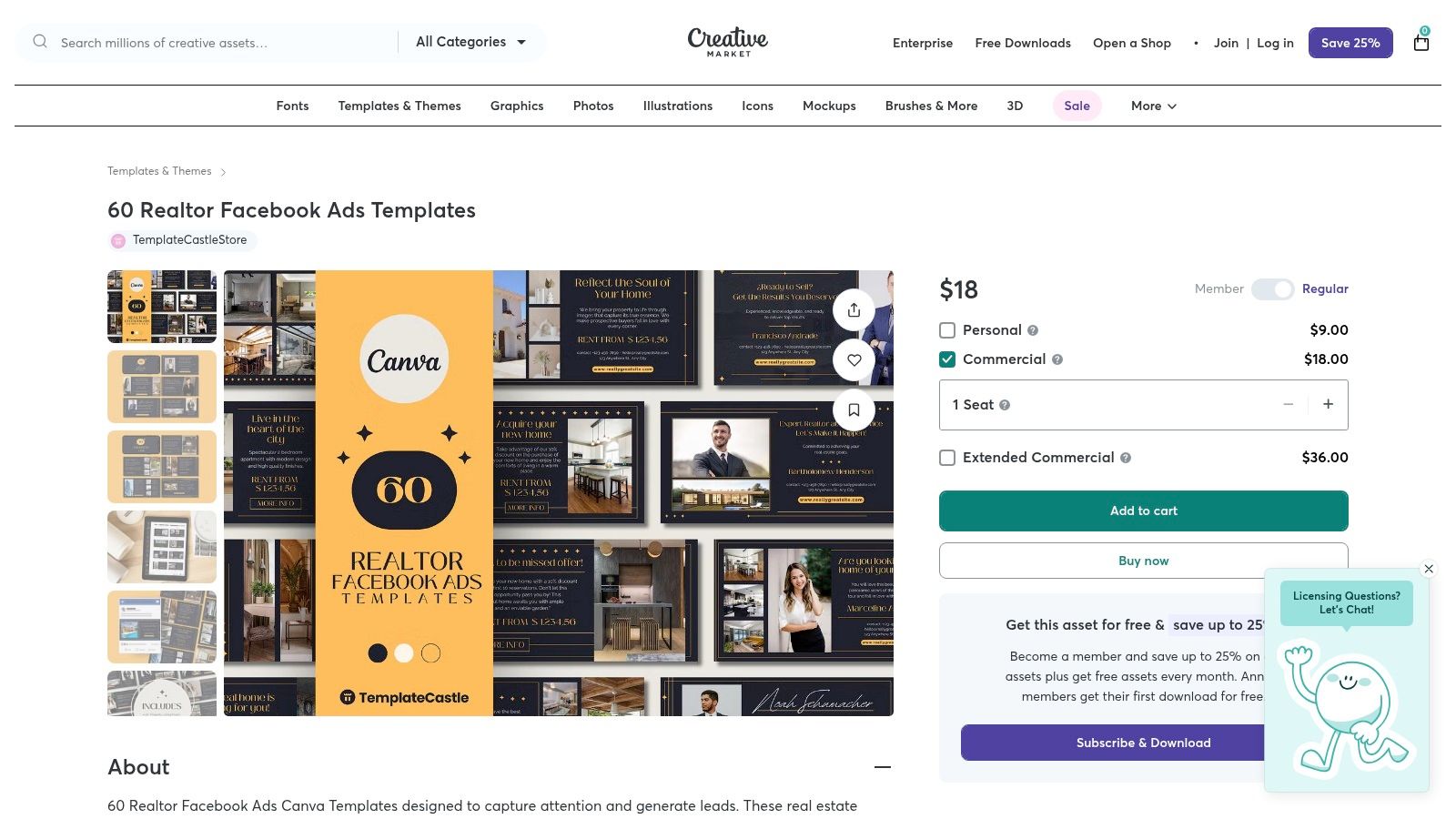
For agents and teams who prioritize a high-end, cohesive brand aesthetic, sourcing ad templates from a curated marketplace is a strategic move. Creative Market stands out by offering professionally designed, premium-quality templates that elevate an agent's visual identity beyond generic, overused designs. This approach ensures your ads look polished and trustworthy from the first glance.
Strategic Breakdown
Using templates from a premium source like Creative Market is less about a specific ad tactic and more about a broader brand strategy. When prospects see your ads, they immediately perceive a level of professionalism and quality that builds subconscious trust. These templates are often part of larger "brand packs," allowing you to maintain a consistent look across Facebook ads, Instagram posts, stories, and even print materials.
The templates available are typically more sophisticated, incorporating modern typography, balanced layouts, and thoughtful color palettes. This higher baseline quality helps your content stand out in a crowded feed filled with DIY-style ads, making it a powerful real estate Facebook ad example of brand-first marketing.
Key Insight: Investing in professional design templates is an investment in your brand's perceived value. A polished, consistent visual identity makes you look more established and successful, which can attract higher-value clients and justify premium commission rates.
Replicating This Ad Strategy
Here’s how to leverage Creative Market templates and integrate them with Saleswise for a powerful, branded ad campaign.
Ad Creative:
- Template Selection: Browse Creative Market for a template pack that aligns with your personal brand. Look for bundles that include various ad types: "Just Listed," "Open House," "Home Valuation," and "Agent Intro." Most templates are available for Canva, Photoshop (PSD), or Illustrator.
- Customization: Personalize the chosen template with your brand colors, logo, and headshot. This initial setup creates a reusable foundation for all future ads.
Ad Copy Template (for a "Just Listed" ad using a premium template):
- Headline:
Modern Living in [Your Neighborhood] | Just Listed! - Primary Text:
Experience the perfect blend of style and comfort at [Property Address]. This stunning [Number] bed, [Number] bath home is officially on the market. ✨ Professionally designed interiors, a gourmet kitchen, and a private backyard oasis await. Want to see more? Click for the full gallery and details. #JustListed #[YourCity]RealEstate #[DreamHome] - Description:
View the Virtual Tour & Full Photo Gallery
Targeting & CTA:
- Audience: Create an audience of users interested in real estate portals (Zillow, Trulia) within a 15-mile radius of the new listing. Layer with interests like "luxury real estate" or "first-time home buyer" depending on the property.
- CTA Button:
Learn More
How Saleswise Accelerates This:
- Generate Listing Content: Use Saleswise to instantly generate a compelling property description. Copy and paste this text directly into your polished Creative Market template.
- Create Enhanced Visuals: For the template's image slots, use Saleswise's Virtual Staging feature on photos of empty rooms to create stunning, fully-furnished visuals that look professionally staged.
- Link to a Smart Landing Page: The ad’s
Learn Morebutton should link to a Saleswise-generated single property website, which will already have the AI-written description, photo gallery, and a lead capture form, creating a seamless and branded user experience.
6. The High-Volume Creative Ad with Envato Elements
For agents who run multiple campaigns simultaneously or test ad creative frequently, sourcing fresh, high-quality visuals can become a significant bottleneck and expense. This is where a subscription-based asset library like Envato Elements becomes an invaluable tool. It provides an almost endless supply of professional templates, allowing you to produce a high volume of diverse real estate Facebook ad examples without hiring a full-time designer.
Strategic Breakdown
The core strategy here is creative diversification and rapid iteration. Instead of relying on one or two ad designs, Envato Elements empowers you to quickly customize and deploy dozens of variations for different listings, target audiences, and offers. This approach is crucial for combating ad fatigue and discovering which visual styles resonate most with your local market.
The platform offers everything from "Just Listed" and "Open House" templates to more general branding and market update graphics. These templates (often in PSD format) are professionally designed with placeholders for your images, text, and branding, ensuring a polished look with minimal effort.
Key Insight: Consistent A/B testing of your ad creative is one of the fastest ways to improve your cost-per-lead. A subscription service like Envato Elements makes this process affordable and scalable, giving you a competitive edge by always keeping your ads fresh and engaging.
Replicating This Ad Strategy
Here’s how you can leverage Envato Elements to build a pipeline of compelling ad creative, enhanced with Saleswise assets.
Ad Creative:
- Image: Download a relevant template (e.g., "New Listing," "Home Valuation"). Customize it in Photoshop or a similar editor with your brand colors, logo, and a high-quality property photo.
- Video (A/B Test): Use a video template from Envato. Combine it with a virtually staged image of a property created using insights from our guide to the best virtual home staging software to create a dynamic, eye-catching ad.
Ad Copy Template:
- Headline:
Modern 3-Bed Oasis in [Your Neighborhood]!(For a listing ad) - Primary Text:
Just Listed! ✨ This stunning [Your City] home features [Highlight 1], [Highlight 2], and a gorgeous backyard perfect for entertaining. Could this be your dream home? Tap below for the full photo gallery and details! #[YourCity]Homes #[NewListing] #[RealEstate] - Description:
View Price, Photos, and 3D Tour.
Targeting & CTA:
- Audience: For a "Just Listed" ad, target people likely to move aged 28-55 within a 15-mile radius of the property. Layer interests like Zillow, Trulia, or luxury real estate.
- CTA Button:
Learn More
How Saleswise Accelerates This:
- Generate Core Assets: Before touching a template, use Saleswise to generate the key content: a compelling property description, a list of neighborhood highlights, and a virtually staged hero image.
- Populate Templates Quickly: With your Saleswise-generated text and images ready, you can quickly populate multiple Envato templates in minutes, creating variations for different platforms (Facebook feed, stories, etc.).
- Enhance with Data: Grab a CMA snippet from Saleswise and incorporate a key data point (e.g., "Average Sale Price in [Neighborhood] is up 8%!") into your ad creative for added authority and urgency.
7. Fiverr: Outsourcing Your Facebook Ad Creation
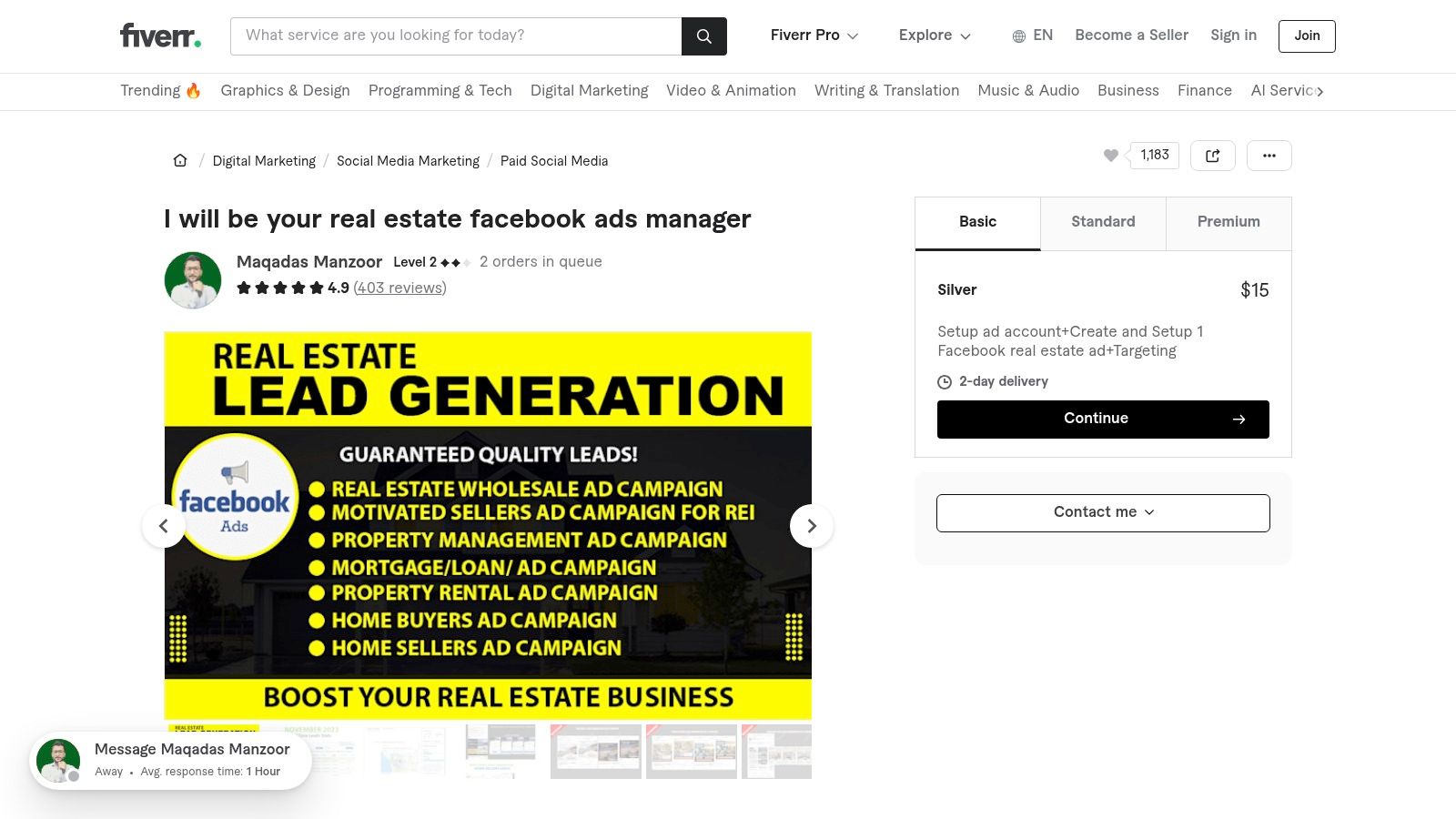
For agents who want the results of a high-performing Facebook ad campaign without the hands-on work, outsourcing is a powerful option. Platforms like Fiverr offer a direct line to freelance marketers who specialize in real estate. Instead of building the ad yourself, you hire an expert who can provide a portfolio of successful real estate Facebook ad examples they have created, allowing you to vet their style and quality upfront.
Strategic Breakdown
The strategy here is leverage. By hiring a specialist, you tap into their experience, creative skills, and technical knowledge of the Facebook Ads Manager platform. This approach is ideal for agents who are time-poor or prefer to focus on client-facing activities rather than digital marketing. You can browse various "gigs," compare seller ratings and reviews, and review their portfolios to find a style that matches your brand.
The key is to treat it as a partnership. A good freelancer will not just execute but will also offer strategic advice on targeting, copy, and creative direction. The initial investment in a gig is separate from the ad spend, but it can pay for itself through more efficient campaigns and higher-quality lead generation.
Key Insight: Outsourcing your ad creation allows you to access specialized expertise on demand. Vetting a freelancer's portfolio of past ad examples is the most critical step to ensure their work aligns with your goals and brand identity.
Replicating This Strategy
Here’s how you can effectively use Fiverr to launch your ad campaigns while using Saleswise to provide the core assets your freelancer will need.
Finding a Freelancer:
- Search: Use specific keywords like "real estate Facebook ads" or "realtor lead generation."
- Vet Portfolios: Carefully examine the examples in their gig images and portfolios. Do they look professional? Is the copy compelling? Do they have a track record of success?
- Check Reviews: Look for detailed reviews from other real estate professionals.
Providing Assets (The Brief):
- Objective: Clearly state your goal (e.g., generate seller leads, promote an open house, build brand awareness).
- Creative Assets: Provide the high-quality photos, videos, and branding materials your freelancer will use.
- Copy Direction: Give them a clear idea of your target audience and the key message you want to convey.
- Targeting Info: Share details about your farm area, including zip codes and key demographics.
How Saleswise Accelerates This:
- Generate Professional Assets: Before hiring, use Saleswise to create the exact assets the freelancer will need. Generate a high-resolution virtual staging image of a listing, a compelling AI-powered property description, or a CMA snippet.
- Provide High-Value Lead Magnets: Give your freelancer the landing page link generated by Saleswise. This page can host your free home valuation tool or a detailed neighborhood report, ensuring the traffic they generate has a high-converting destination.
- Streamline Your Brief: Instead of writing lengthy instructions, you can simply provide the freelancer with your Saleswise-generated assets. This ensures brand consistency and gives them professional, high-quality material to work with, leading to a much better final ad.
7-Tool Comparison: Real Estate Facebook Ad Examples
| Tool | 🔄 Implementation complexity | ⚡ Resource requirements | 📊 Expected outcomes | 💡 Ideal use cases | ⭐ Key advantages |
|---|---|---|---|---|---|
| Meta Ad Library | Low — browse & filter interface (no setup) | Minimal — free, browser access | Observational insights; examples but limited performance data | Competitive research, compliance checks, ad inspiration | Official source with live ad examples and transparency |
| Canva | Low–Medium — drag-and-drop; built-in publish flow | Moderate — free tier; paid for premium assets/team features | Fast production of publish-ready, on-brand variants | Agents/teams needing quick templates and collaboration | Large template library; easy scaling of variants |
| Adobe Express | Low–Medium — simple editor; one-click resize | Moderate — free + Premium for stock and assets | Polished visuals with strong brand controls | Non-designers wanting refined ads and brand consistency | Strong brand kits and Adobe Stock integration |
| Etsy | Low — purchase & edit templates (often for Canva) | Low — pay-per-bundle; requires Canva/editor access | Turnkey niche-specific creative; no performance guidance | Agents seeking inexpensive, niche “Just Listed/Open House” packs | Very low cost per bundle and wide variety of niche templates |
| Creative Market | Medium — download and edit (may need Photoshop) | Moderate — one-time purchases; sometimes software required | Higher-end, consistent brand-ready assets | Teams/agents wanting premium aesthetics and clear licensing | Professional-quality templates and licensing clarity |
| Envato Elements | Medium — subscription + download + edit | Moderate — subscription fee; many files require design software | Cost-effective pipeline for ongoing testing and iteration | Ongoing creative needs; agencies or high-volume advertisers | Unlimited downloads under a single commercial license |
| Fiverr | Variable — depends on vendor and scope; coordination needed | Variable — gig fees + separate ad spend; time to vet sellers | Custom creative and campaign services; outcomes vary by provider | Outsourcing production, campaign setup, or full management | Access to specialists/portfolios and flexible budgets |
Turn These Examples into Your Next Lead Generation Machine
You've just walked through a comprehensive gallery of high-performing real estate Facebook ad examples, each powered by accessible and effective tools. We’ve dissected everything from the strategic use of Canva templates for "Just Listed" announcements to leveraging Fiverr talent for captivating video tours. The core lesson is clear: you don't need a Madison Avenue budget to create ads that stop the scroll and fill your pipeline. Success lies in a strategic, repeatable process.
The most effective campaigns we analyzed share a common DNA. They pinpoint a specific audience need, present a high-value offer (like a free home valuation or a list of off-market homes), and deliver it with clean, professional creative. They move beyond simply showcasing a property and instead solve a problem or fulfill a desire for their target market. This is the fundamental shift from advertising to value-driven marketing.
Key Takeaways for Immediate Action
To transform these insights into tangible results, focus on these critical pillars derived from the examples:
- Clarity Over Clutter: Your primary goal is to communicate one clear message. Whether it's a "Coming Soon" teaser or a "First-Time Homebuyer Seminar" invitation, your ad copy, creative, and call to action must all point to a single, desired outcome.
- Value-First Offers: The strongest ads offer something of genuine value in exchange for a user's contact information. This could be a Saleswise-generated CMA report, a detailed neighborhood guide, or exclusive access to a webinar. Generic "Contact Me" CTAs are a relic of the past.
- Hyper-Local Targeting: Broad, city-wide targeting is inefficient. Drill down into specific zip codes, neighborhoods, and demographics. Use Facebook’s detailed targeting to reach renters with interests in homeownership or homeowners likely to move based on life events.
- Test, Measure, Repeat: Don't just set and forget your campaigns. A/B test your headlines, images, and offers. The examples from the Meta Ad Library showed that even small tweaks can lead to significant differences in cost-per-lead. Track your metrics relentlessly to understand what truly resonates.
Your Blueprint for Launching a Winning Campaign
Feeling inspired is one thing; taking action is another. Here is your step-by-step plan to launch your next campaign this week using the tools and strategies we've covered:
- Define Your Objective: What is the single most important action you want someone to take? (e.g., download a seller's guide, register for a webinar, request a home valuation).
- Select Your Ad Type: Based on your objective, choose one of the ad formats we analyzed. A lead form ad is excellent for capturing information directly, while a traffic ad with a strong landing page can provide more detail.
- Craft Your Creative: Use Canva or Adobe Express to design a visually appealing image or video. Remember the principles: high-quality photos, minimal text overlay, and a clear focal point. For an extra edge, hire a professional on Fiverr or Envato Elements to create a polished video.
- Write Compelling Copy: Start with a hook that addresses a pain point. Clearly state your value proposition and end with an unambiguous call to action. Use AI tools like Saleswise to generate data-driven listing descriptions or market insights to make your copy more authoritative.
- Launch and Optimize: Set up your campaign in Facebook Ads Manager with precise targeting. Monitor its performance daily for the first few days and be prepared to make adjustments to your budget, audience, or creative to maximize your return on ad spend.
By systematically applying these frameworks, you move from guessing what might work to implementing what has been proven to work. To further your understanding of effective lead generation, consider how to generate leads for your real estate business with a multi-channel approach that complements your social media efforts. These real estate Facebook ad examples are not just case studies; they are your roadmap to building a more predictable, scalable, and profitable business.
Ready to stop manually piecing together market data and property descriptions for your ads? Saleswise is the AI engine that instantly creates the high-value content your Facebook ads need to succeed, from hyper-local CMA reports to compelling listing narratives. Elevate your ad campaigns from good to unstoppable by visiting Saleswise and start generating smarter marketing materials in minutes.